Okay, so Android 14 is
-here*, and it’s more than just a number change. It feels like a really thoughtful evolution of the OS, building on everything Google learned with Material You and really focusing on making things…better. Not just flashier, but genuinely more useful and personalized. It’s a big deal for everyone – from us everyday users to the developers building the apps we love, and even the manufacturers shaping the phones we hold.
This isn’t about a radical overhaul, it’s about refinement. Android 14 doubles down on customization, privacy, and performance. We’re talking about more control over your data, a phone that feels uniquely
-you*, and a smoother, more responsive experience overall. Let’s unpack what makes this update so exciting and how it’s going to change the way we use our phones.
Android 14: A Deep Dive into the Latest Release
Android 14 isn’t a radical overhaul, but a thoughtful evolution of the platform. It builds upon the foundations laid by Android 13, focusing on refinement, user control, and developer tools. It’s less about flashy new features and more about polishing the experience and making Android more secure and adaptable. This release represents Google’s continued commitment to a stable, performant, and customizable operating system.
The core philosophies driving Android 14 are centered around giving users more agency over their devices, enhancing privacy without sacrificing functionality, and providing developers with the tools they need to create exceptional apps. It’s designed for everyone – from the everyday user who wants a more personalized experience, to manufacturers looking to differentiate their devices, and developers striving to build innovative applications.
Android 14 vs. Android 13: A Feature Comparison
| Feature | Android 13 Status | Android 14 Status | Brief Description |
|---|---|---|---|
| Monochrome Theme | Limited | Enhanced | Expanded monochrome theme options for a more minimalist aesthetic. |
| Lock Screen Customization | Basic | Advanced | Greater control over lock screen clocks, shortcuts, and styles. |
| Granular Photo/Video Access | App Access to All | Selective Access | Users can grant apps access to specific photos and videos, not the entire library. |
| Non-Linear Font Scaling | Not Available | Available | Font sizes scale more intelligently, improving readability for users with visual impairments. |
| Background Optimization | Standard | Improved | More aggressive background process management for better battery life. |
Enhanced Customization Options
Android 14 takes personalization to a new level. While Material You introduced dynamic color theming with Android 12, Android 14 expands on this, offering more granular control and introducing entirely new aesthetic options. It’s about making your phone truly
-yours*, reflecting your individual style.
Monochrome Themes and Dynamic Color Palettes
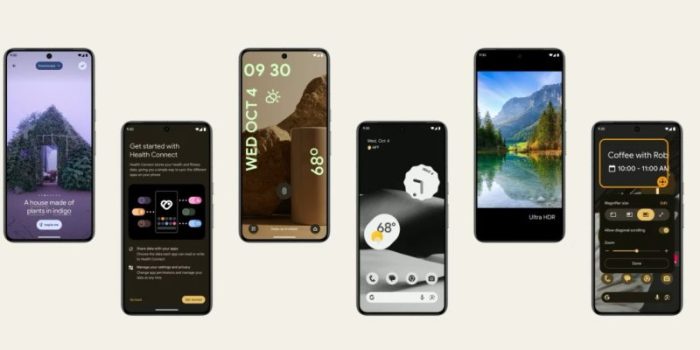
The monochrome theme in Android 14 is significantly improved. It’s not just a grayscale filter anymore; it offers a range of shades and tones, allowing for a sophisticated and minimalist look. The dynamic color palettes, powered by Material You, continue to adapt to your wallpaper, but now with more nuanced color extraction and application across the system. This means a more cohesive and visually pleasing experience, where the colors of your apps and system elements harmonize with your chosen background.
Lock Screen Personalization
Lock screen customization has received a major overhaul. Users can now choose from a variety of clock styles, sizes, and colors. Shortcuts can be added to the lock screen for quick access to frequently used apps or actions, like the flashlight or camera. Imagine being able to quickly launch your music player or check your calendar without unlocking your phone – that’s the level of convenience Android 14 offers.
Material You Expansion
Material You theming is no longer limited to Google apps. Android 14 encourages developers to adopt Material You principles, allowing for a more consistent and visually integrated experience across all apps. This means that apps will dynamically adapt to your chosen color scheme, creating a more harmonious and aesthetically pleasing user interface. The result is a more unified and polished look and feel throughout the entire operating system.
User Scenarios for New Customization Options
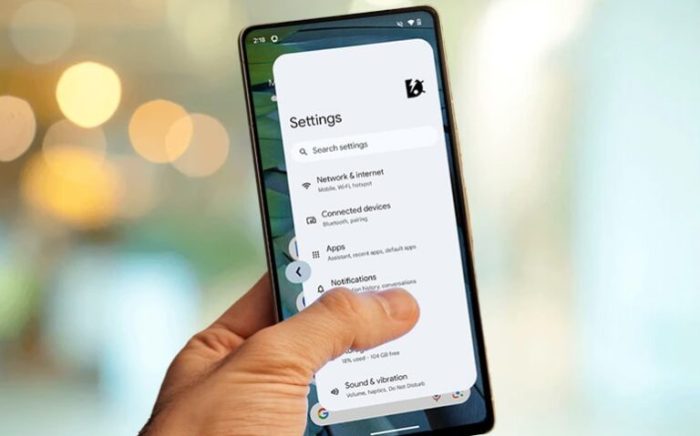
Source: droidthunder.com
- A user who prefers a minimalist aesthetic can utilize the monochrome theme to create a clean and uncluttered interface.
- A photographer can personalize their lock screen with a custom clock and a shortcut to the camera app for quick access.
- A busy professional can add shortcuts to their calendar and email apps to the lock screen for instant access to important information.
- A user with visual impairments can adjust font sizes and color contrast to improve readability and accessibility.
- Someone who frequently listens to music can add a music player shortcut to the lock screen for easy control.
Privacy and Security Improvements
Android 14 doubles down on privacy and security, giving users more control over their data and protecting them from potential threats. These aren’t just incremental changes; they represent a significant step forward in safeguarding user information.
Granular Photo and Video Access Controls
One of the most impactful privacy features in Android 14 is the ability to grant apps access to specific photos and videos, rather than the entire media library. This means you can share a single photo with an app without giving it access to your entire collection. This level of control significantly reduces the risk of apps accessing sensitive or personal information without your explicit consent.
Enhanced Data Security and Permission Management
Android 14 introduces improved permission management and stricter restrictions on background activity. Apps are now required to justify why they need certain permissions, and the system is more proactive in identifying and limiting malicious behavior. Background processes are more carefully monitored and optimized to reduce battery drain and prevent apps from silently collecting data in the background.
Sensitive User Data Handling
Source: phandroid.com
The way apps handle sensitive user data has also been updated. Android 14 provides developers with new APIs and guidelines for securely storing and processing sensitive information. Users have more transparency into how their data is being used, and they have the ability to revoke permissions at any time.
“The new privacy features in Android 14 necessitate a shift in app development practices. Developers must prioritize user privacy and transparency, and adopt secure coding practices to protect sensitive data. Failure to do so could result in app rejection or user distrust.”
Accessibility Features
Android 14 continues to build on Google’s commitment to accessibility, making the platform more inclusive for users with disabilities. These features aren’t just add-ons; they’re integral to the core design of the operating system.
Non-Linear Font Scaling
The new non-linear font scaling feature is a game-changer for users with visual impairments. Traditional font scaling simply increases the size of all text elements, which can sometimes lead to overlapping or distorted text. Non-linear font scaling intelligently adjusts the size of different text elements based on their importance and context, ensuring that text remains readable and visually appealing even at larger sizes.
This provides a more comfortable and natural reading experience.
Hearing Aid Support and Assistive Technology Compatibility
Android 14 includes improvements to hearing aid support and compatibility with assistive technologies. The system now supports a wider range of hearing aid protocols and offers more granular control over audio settings. Developers are encouraged to use accessibility APIs to ensure that their apps are fully compatible with assistive technologies, such as screen readers and switch access devices.
Accessibility for Motor Impairments
Gesture navigation has been improved to enhance accessibility for users with motor impairments. The system now offers more customizable gesture controls and supports alternative input methods, such as switch access. These improvements make it easier for users with limited mobility to navigate and interact with their devices.
Accessibility Feature Categorization
Source: guidingtech.com
- Visual Impairments: Non-linear font scaling, screen reader compatibility, high contrast themes, color correction.
- Auditory Impairments: Hearing aid support, captioning options, sound amplification.
- Motor Impairments: Gesture customization, switch access, voice control.
- Cognitive Impairments: Simplified user interface, text-to-speech, visual cues.
Last Recap
Android 14 isn’t just a collection of new features; it’s a statement about Google’s commitment to a user-centric experience. The focus on personalization, privacy, and accessibility is genuinely impressive, and the under-the-hood optimizations promise a noticeable improvement in daily use. It’s a solid step forward for the Android ecosystem.
For developers, it’s a chance to build even better apps, and for us, it’s a chance to enjoy a more secure, customizable, and efficient mobile experience. It’s a really well-rounded update that addresses a lot of the things people have been asking for, and I’m excited to see how it evolves in the future. Definitely worth checking out!
FAQ
Will Android 14 slow down my older phone?
Not necessarily! While newer phones will benefit the most, Android 14 includes optimizations designed to improve performance even on older hardware. However, very old devices might experience some limitations.
Can I revert to Android 13 if I don’t like Android 14?
Generally, no. Reverting to a previous Android version is difficult and often not officially supported. It usually involves wiping your device and flashing an older firmware, which can be risky.
What about the impact on third-party launchers?
Android 14 introduces changes that may affect some third-party launchers. Developers are working to ensure compatibility, but some features might not work perfectly initially.
Does Android 14 improve 5G connectivity?
Yes, Android 14 includes improvements to 5G connectivity, potentially leading to faster speeds and more reliable connections, depending on your carrier and hardware.
Is there a dark mode schedule customization?
Android 14 allows for more granular control over dark mode scheduling, letting you set it to turn on and off based on sunrise and sunset times, rather than just a fixed schedule.